Learn Coding
Step into the magical world of coding and become a wizard of programming languages, puzzles, and problem-solving adventures!
Explore Techs
Join our team of young explorers as we embark on thrilling adventures to discover the wonders of technology, from building circuits to creating cool gadgets.
Discover Robotics
Embark on an exciting journey into the realm of robotics, where you'll build, program, and unleash your creativity to create your own robotic inventions.
Why introduce Coding?
In today's digital age, coding has become a fundamental literacy skill, akin to reading and writing. According to recent studies, over 70% of new jobs in STEM fields require proficiency in coding and computational thinking. By teaching coding to kids, we empower them with the tools to understand and interact with the technology shaping their world. Coding fosters critical thinking, problem-solving, and creativity, essential skills for success in the 21st century.
Moreover, coding education promotes computational thinking, encouraging children to break down complex problems into manageable parts and develop logical solutions. Beyond the practical benefits, coding sparks curiosity and innovation, inspiring children to explore new possibilities and pursue their passions. Ultimately, coding for kids opens doors to diverse career opportunities in technology, equipping them with the skills to thrive in an increasingly digital future.
A line-following robot is a simple autonomous robot that detects and follows a black line using sensors. It’s an excellent project for beginners in robotics and Arduino. In this tutorial, we'll guide you step-by-step to build your own line-following robot using an Arduino Uno, L293D motor driver, IR sensors, DC motors, and a few other basic components.
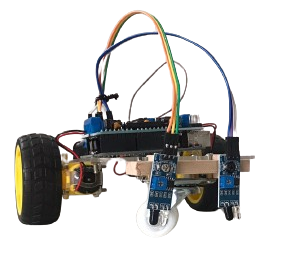
Components Needed
- Arduino Uno: The brain of your robot. It controls the sensors and motors.
- L293D Motor Driver: This dual H-bridge motor driver allows the Arduino to control two DC motors.
- IR Sensors: These sensors detect the black line on a white surface. They use infrared light to determine if the robot is on or off the line.
- DC Motors: Power the wheels, providing mobility to your robot.
- Wheels: Attached to the DC motors to allow movement.
- Chassis: The structure that holds everything together.
- Power Supply: Either batteries or a portable power source to run the motors and Arduino.
An obstacle avoidance robot is a smart robot that can navigate around obstacles without human intervention. It uses sensors to detect objects in its path and moves away from them accordingly. This project is great for anyone looking to get started with more advanced robotics using an Arduino. Let’s walk through how to build your own obstacle-avoiding robot using an Arduino Uno, L293D motor driver, and ultrasonic sensor.

Components Needed
- Arduino Uno: The central controller that processes the sensor input and controls the motors.
- L293D Motor Driver: This motor driver allows the Arduino to control two DC motors for the wheels.
- Ultrasonic Sensor (HC-SR04): This sensor detects objects in front of the robot by sending out ultrasonic waves and measuring the time it takes for the waves to bounce back.
- DC Motors: Used to move the robot's wheels forward, backward, and to steer left and right.
- Wheels: Attach to the motors to provide mobility to the robot.
- Chassis: The body of the robot that holds all components together.
- Power Supply: A battery or another power source to run the motors and Arduino.
A mobile-controlled robot allows you to control its movement remotely using a smartphone via Bluetooth. In this project, you’ll learn how to build a Bluetooth-controlled robot using an Arduino Uno, an L293D motor driver, and an HC-05 Bluetooth module. This project is ideal for those looking to explore wireless communication with robotics.

Components Needed
- Arduino Uno: The microcontroller that interprets the Bluetooth signals and controls the motors.
- L293D Motor Driver: A dual H-bridge motor driver that allows the Arduino to control two DC motors.
- Bluetooth Module (HC-05): This module enables communication between the Arduino and your smartphone via Bluetooth.
- DC Motors: These drive the robot’s wheels for movement.
- Wheels: Attached to the motors to move the robot.
- Chassis: The body that holds all components together.
- Power Supply: A battery pack or other portable power source to run the motors and Arduino.
Kids will Develop
Technical Skills
Embracing Digital Proficiencies
Creativity
Unleashing Imagination and Innovation
Troubleshooting Skills
Tackling Challenges with Creativity
Confidence
Building Self-Assurance and Self-Belief
Technical Skills
Embracing Digital Proficiencies
Trusted By